
Expiry date and batch labels for inventory: generate, print and count by camera
By mise · Updated November 11, 2026
Quick answer: Tracking expiry dates and batches starts with the date visible on every piece. In mise you generate the label with expiry date, batch and QR, print it from your phone and count each piece by camera, along with its date.
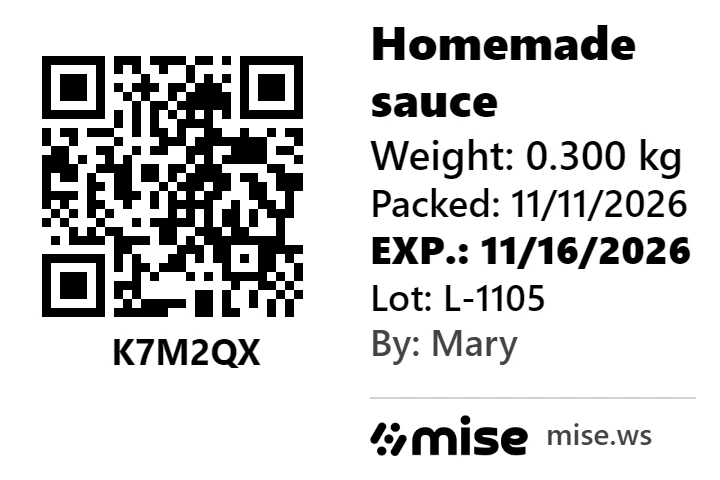
Loss from expired stock hurts the most because it is the most avoidable: the product was right there, nobody just saw the date. This guide shows how to organize expiry dates and batches with labels, and how mise counts each piece with its date.
Expiry date and batch: what each one solves
| Expiry date | Batch | |
|---|---|---|
| Question it answers | How long can I use it? | Which production run is it from? |
| When it matters | Every day, when using and restocking | When there is a problem and you need to pull product |
| Where it shows up in mise | Label (always) and QR scan | Label and QR scan |
The rule that prevents loss: the oldest goes out first
In kitchens, butcher shops, bakeries and dark kitchens the rule is first expired, first out. It only works if every piece has its date visible. A legible label in the fridge, with the expiry date highlighted, is what lets anyone on the team, not just whoever prepared it, pick the right piece.
How to set it up in mise
- Generate the label from the product page. Expiry date always; you choose preparation date, batch, weight, free text and person in charge.
- Print and stick. Four sizes, from 40 × 30 mm to 100 × 50 mm. Printing goes through your phone's share sheet.
- Count by camera. mise reads the QR and counts 1 piece, with the expiry date and batch from that label.
- Close the count. The difference between what came in, what is there and what went out shows the loss, in units and in money.
Factory-made products count too
The label is not only for what you make. A product with a barcode, such as sliced cheese, opened cold cuts or a portioned dessert, can also get a label with the opening date and an internal batch, so you can track what the factory barcode does not show.
Frequently asked questions
How do you track product expiry dates in stock?
Put the date where you can see it on every piece, use the oldest first and count regularly. In mise, the label carries the expiry date and the QR; scanning it with the camera counts the piece along with its date.
What is the difference between expiry date and batch?
The expiry date tells you how long you can use it. The batch tells you which production run it is from. With the batch, a problem in one run does not force you to throw everything away.
Which label size should I use?
For a small jar, 40 × 30 mm or 50 × 30 mm. For a bigger box or container, 60 × 40 mm or 100 × 50 mm. All of them carry the expiry date, batch and QR.
Can I use the label on a product with a barcode?
Yes. It is useful for recording the opening date or an internal batch for a factory-made product.
How much does it cost?
Free trial, no card required.
Labels with expiry date and batch, QR scanning and counting by camera. Free trial, no card required.
Create a free account