
QR code labels for homemade products: expiry date and batch when you count
By mise · Updated November 11, 2026
Quick answer: Homemade products have no barcode, so a label with a QR code is what gives them an expiry date, a batch number and phone scanning. In mise you generate the label from the product page, print it from your phone and, when you count, the camera reads the QR and counts 1 piece with its expiry date and batch.
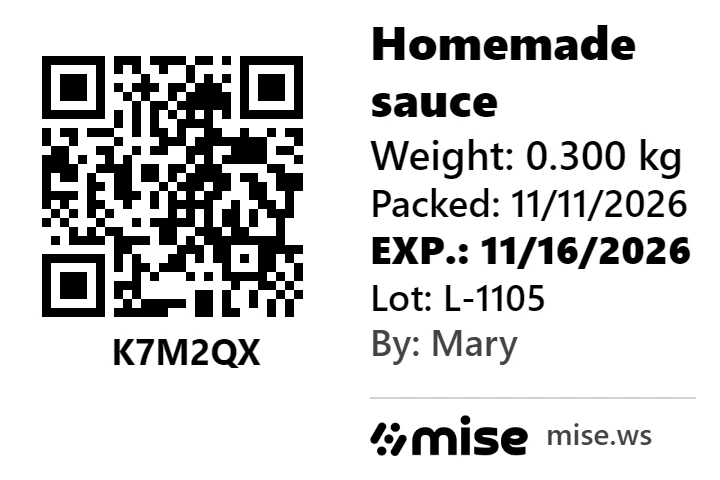
Jam, sauce, pickles, meal prep, cheese, cake in a jar: if you make food at home or in a small kitchen, you need to know what is in the fridge, how long it is good for and which day each batch is from. This guide shows how mise generates a QR label with the expiry date and batch, and how the camera reads that label when you count.
Why label what you make yourself
Homemade products have no barcode. Without one, stock turns into a notebook: "I have about eight jars of sauce, I think from last week". A label solves three problems at once: it shows how long it is good for, it shows which batch it is from (if a batch has a problem, you know which jars to pull) and it gives the product a code your phone can read.
What goes on a mise label
Every product page has a Label button. You choose the size and which lines appear:
| Line | What it is for |
|---|---|
| Expiry date | Always on the label. It is the date that matters in the fridge. |
| Preparation date | The day you made it. Helps you see what is oldest. |
| Batch | Identifies the production run. If a batch has a problem, you know which jars it covers. |
| Weight | Weight of the piece, when it makes sense (cheese, meat, meal prep). |
| Free text | A short note: "keep refrigerated", "gluten-free". |
| Person in charge | Who prepared it, useful when more than one person works in the kitchen. |
There are four sizes: 40 × 30 mm (small), 50 × 30 mm, 60 × 40 mm and 100 × 50 mm (large). The QR comes with it, and works both for products without a barcode and for factory-made products you want to track by batch.
How it works in practice
- Add the product once. Name and unit. No barcode? It goes in as a manual product and stays on your list.
- Open the product page and tap Label. Pick the size, the lines and the expiry date.
- Print from your phone. mise opens the phone's share sheet: use your Bluetooth printer's app or AirPrint.
- Stick it on the jar. Each label is one piece, with its own expiry date and batch.
- When you count, point the camera. mise reads the QR and counts 1 piece, already with its expiry date and batch.
Printer: what to use
For small labels, pocket thermal printers with Bluetooth are the most common choice: they need no ink, print straight from your phone and the adhesive label rolls are cheap. Before you buy, check that the printer's app accepts the image from the phone's share sheet. Print a test label and scan it with the camera: if the QR reads, you are ready.
What a mise label does not do
Frequently asked questions
What goes on a homemade product label?
For tracking your own stock: product name, production or preparation date, expiry date and batch. The labeling required to sell food (ingredients, allergens, nutrition information) depends on the type of product and the region; check with your local food safety authority.
Do homemade products need a batch number?
The batch shows which production run each piece came from. If one batch has a problem, you know exactly which units to pull instead of throwing everything away.
QR code or barcode on the label?
A QR code holds more information in the same space and a phone camera reads it easily. That is why mise puts a QR on the label, with the expiry date and batch.
Does mise print the label?
mise generates the label (size, lines, expiry date, batch, QR) and opens your phone's share sheet. Your own printer does the printing, through its app over Bluetooth or through AirPrint.
Does it work with factory-made products too?
Yes. You can generate the label for a manual product or for a product with a barcode, whenever you want to track the expiry date and batch of each piece.
How much does it cost?
Free trial, no card required.
Expiry date, batch and QR on every piece, from manual products to factory-made ones. Free trial, no card required.
Create a free account