
No more waste, guesswork and losses
A complete, categorized database: just scan the barcode and you know your stock. Log stock in and stock out, and your on-hand count updates instantly.
No spreadsheets, no product setup, no training. For restaurants, bars, liquor stores, bakeries, hotels, pharmacies, retail and grocery stores.


Already have an account? Sign in
mise finds it for you.
-
Scan the barcode or snap a photowith your phone camera
-
mise AI finds the productinstantly
-
Product fully categorizedname, brand, category, photo, price and more
-
Inventory under controlcounts, stock on hand and losses across your operation
Track stock every day. Count to verify it.
On hand and history track every stock movement. The count compares one period with the next and shows what went missing.
Every stock movement, tracked.
A delivery arrives: stock in. It goes to the kitchen or the floor: stock out. Each product's on hand updates instantly, and the history logs every movement: who, how much, when and where.
Stock in · Stock out · On hand · History · Par levelsPeriod-over-period comparison.
You count what's on the shelf, run service, count again. mise compares both counts with everything that came in and went out in between and shows the result: losses, usage and COGS.
Count · Period · Usage · Loss · COGSFull control in your pocket.
Open the app and see your current inventory: what it's worth, how many products and how many units. Filter by location — bar, kitchen, storeroom — and by period.
Three tabs. On hand: what you have right now, item by item. History: every stock movement — who, how much, when and where. Analysis: where the money went. Share any of them as PDF or Excel, straight from your phone.
You don't have to add a single product.
A complete database of pre-categorized products for every type of business. You scan the barcode and mise AI finds the product and categorizes it for you.
The product comes back complete: category Beverages, subcategory Whisky, brand Johnnie Walker, 1-liter bottle, plus type, unit, weight, photo and reference price. If the product isn't in the database yet, the AI finds and categorizes it on the spot — and it's there for your next count. No barcode? A photo of the label is enough.
What's running low becomes an order.
Set a par level for each product. Whatever went out and dropped below par lands on a list ready to send to your supplier.
You set how much you need of each item. mise watches what's on hand and alerts you when it drops below par.
The list builds itself from what's on hand: how much you need to get back to par, item by item. No more notes on paper.
Check it, adjust it and share it as PDF or Excel, straight from your phone.
Loss stops being a hunch and becomes a number.
Count today, run your week, count again. mise compares both counts and shows what's missing, item by item, by quantity and value.
The math is simple and mise does it for you: take the opening count, add what came in, subtract what went out, and you get what you should have. Compare it with the closing count. Whatever is missing is loss: breakage, theft or unrecorded use. What disappeared becomes a number, not a suspicion.
Your true COGS, no estimates.
Snap a photo of the supplier invoice: every item goes into inventory at the price you paid. Between two counts, mise calculates the period's usage and shows the true cost.
Snap a photo of the invoice and every item lands in inventory at the price you paid, no typing.
Between two counts, mise knows what was used and what each item cost.
Usage times invoice price is the true COGS for the period. No estimates, no made-up averages.
Export in the format you need.
Counts, stock on hand and reports in Excel, PDF or CSV — for your accountant, other systems, or to share with your team.
Every count and every report comes out ready to open, print or paste into a spreadsheet. No retyping.
Export to Excel or PDF, ready to share with your team or accountant.
Send the report to your partner, manager or accountant straight from your phone, by email or WhatsApp. Everyone's looking at the same numbers.
What every dish you sell really costs.
Build the recipe from products already in your inventory. mise calculates the cost and shows the margin on every menu item.
Every ingredient comes from your inventory at the price you paid. When the purchase price changes, the recipe cost changes with it.
Total cost, cost per portion and the profit margin on the menu price. No calculator.
Enter the recipe's yield and mise splits the cost into portions. Add a yield factor for what's lost in trimming and prep.
The open bottle counts too.
Connect a Bluetooth scale and weigh whatever's open: meat, bulk goods and liquor poured by the shot. The weight is recorded automatically.
Pair the scale once. With the product scanned, the stable weight is entered automatically — no typing.
Half a bottle of whisky, the rest of the cheese, the meat in the freezer. Nothing is left out of the count.
mise knows the packaging weight and subtracts it. What's left is the actual product.
Homemade products get labels too.
Generate a label for any product, from what you make yourself to factory-made items with a barcode: expiry date, batch and QR. Print it from your phone and, when you count, the camera reads the QR and counts the piece.
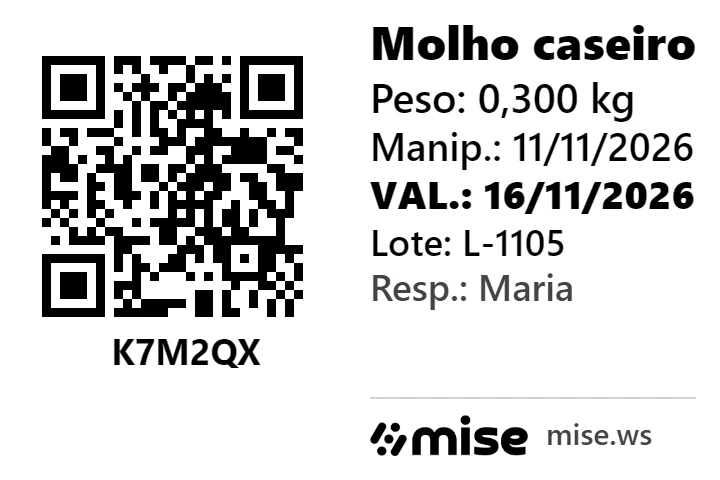
Jam, sauce, meal prep, sliced cheese. The label comes from the product page, with or without a barcode.
Expiry date always; weight, preparation date, batch, free text and person in charge, in 4 sizes, from 40 × 30 to 100 × 50 mm.
Each scan counts 1 piece, with the expiry date and batch from that label. No typing.
Labels for homemade products · Expiry date and batch for inventory
Build your counting team. Control what each person sees.
Set up separate locations for bar, kitchen, storeroom and walk-in. Invite the people who count and choose what each one can see and do.
Invite people from your phone and they join on their own device. Counters can count without seeing prices or values: you see everything, they see only their location. Everyone in their role, no clipboards changing hands.
Start with a free trial.
3 months free, up to 20 products.
No credit card required. Try everything for free, then decide.
Manage up to 20 products in your stock for 3 months, without paying anything and with no card. Need more? Activate the plan whenever you want.
Pro
Bars, restaurants, hotels, convenience stores, pharmacies, liquor stores, retail and grocery stores.
Everything in Basic + data upload, recipes, purchases and sales, invoices, team and locations.
after your free trial
for more than 20 products
Free trial. Then US$29.99 a month.
Free up to 20 products. For more, €24.99 a month.
Start today for free — you won't be charged until after the free trial.
No card. Up to 20 products in stock, free for 3 months.
Secure payment via Stripe: card, Apple Pay or Google Pay.
- Unlimited counts and items
- Current stock
- Stock in and out control
- Barcode scanning with name, photo and price
- Par levels, with alerts for what is running low
- Order list
- Upload your product list
- Localidades: vários locais na mesma loja
- Invoices (OCR scanning and XML)
- Recipe costing
- Upload purchases and outflows
- Analysis and COGS
- Team: invite people to count with you
- ERP integration (add-on, on request)
- Up to 20 products in stock
- Unlimited counts of those 20 products
- Barcode scanning with name, photo and price
- Ready product database, already categorized
- Losses and overages between counts
- More products? Activate the full plan
Basic
Unlimited counts and products, current stock, stock in and out and analysis. No data upload, recipes, purchases or sales.
Secure payment via Stripe: card, Apple Pay or Google Pay.
- Unlimited counts and items
- Current stock
- Stock in and out control
- Barcode scanning with name, photo and price
- Par levels, with alerts for what is running low
- Order list
- Upload your product list
- Localidades: vários locais na mesma loja
- Invoices (OCR scanning and XML)
- Recipe costing
- Upload purchases and outflows
- Analysis and COGS
- Team: invite people to count with you
- ERP integration (add-on, on request)
Consultant
Are you an inventory consultant, a bartender, an operations manager or someone who works in a venue every day? mise is for you too: your own tool for professional counts, inventory audits and full reports.
- Professional counts across multiple clients
- Inventory audits
- Full reports
Want to start an inventory service business? See how
Chat with us on WhatsAppSet yourself up for success.
Free trial, no credit card. 3 months free, up to 20 products. Scan a barcode or snap a photo and the product pops up complete, ready to count.
Sign in with the same email on your phone and your computer.
Already have an account? Sign in
From the French, mise en place means "everything in its place": in a professional kitchen, it's getting every ingredient and every tool ready before service starts.
Just as every great dish starts with prep, mise gets your business ready to succeed. Everything in its place, every stock movement recorded — and full control of your inventory and your operation.